Why Apple Creator Studio Matters More Than Another Siri Update
Apple announced Creator Studio last week, and most of the coverage focused on the obvious: Final Cut Pro, Logic Pro, and the newly acquired Pixelmator Pro bundled together for $12.99 a month. A creative suite to rival Adobe. Good value for professionals, great value for students at $2.99 a month. The usual.
But I think the interesting story is underneath the bundle.
Look at the feature list Apple buried in the press release. Final Cut Pro now has Transcript Search, which lets you find specific phrases across hours of footage by typing words into a search bar. It has Visual Search, which finds clips by identifying objects or actions in them. Logic Pro has Chord ID, which analyzes any audio recording and extracts the chord progression automatically. It has natural language search in the Sound Browser—describe what you’re looking for, and the AI finds loops that match. Keynote can generate a first draft of a presentation from a text outline. Numbers has something called Magic Fill that recognizes patterns and completes tables for you.
Apple is building AI into every creative tool they make. They’re just not calling it that.
This is classic Apple. While everyone else rushes to ship chatbots and put “AI” in their marketing copy, Apple embeds intelligence into specific workflows and calls it “intelligent features.” No chat interface. No prompt engineering. Just tools that quietly do tedious work so you don’t have to.
And here’s where it gets interesting for anyone watching Apple’s larger AI ambitions. Apple Intelligence launched last year to mixed reviews—useful in spots, underwhelming in others, Siri still frustratingly limited. The criticism was fair. But Creator Studio suggests Apple is thinking about AI differently than the competition. They’re not trying to build a general-purpose assistant that can do anything. They’re building specialized intelligence into domain-specific tools, then connecting those tools together.
Think about what’s now possible within Apple’s ecosystem. Final Cut Pro can transcribe your footage, search it semantically, identify visual content, and detect beats in your music tracks. Logic Pro understands music theory well enough to extract chords from recordings and generate synthesizer performances that respond to complexity and intensity parameters. Pixelmator Pro can upscale images intelligently and suggest crops. These aren’t parlor tricks—they’re genuine workflow accelerators for people who make things for a living.
Now imagine Siri orchestrating across all of them.
“Find the clips from yesterday’s interview where she talks about the product launch, cut them to the beat of that track I was working on in Logic, and put together a rough cut.” That’s not possible today. But the pieces are there. Apple has spent the last few years building the infrastructure for that kind of integration, and Creator Studio is where it becomes visible.
The iPad story is particularly telling. Apple has spent years arguing that iPad is a serious creative tool, not just a consumption device, and the market has been skeptical. Fair enough—for most professional workflows, iPad apps have been watered-down versions of their Mac counterparts, missing key features that made the desktop versions indispensable.
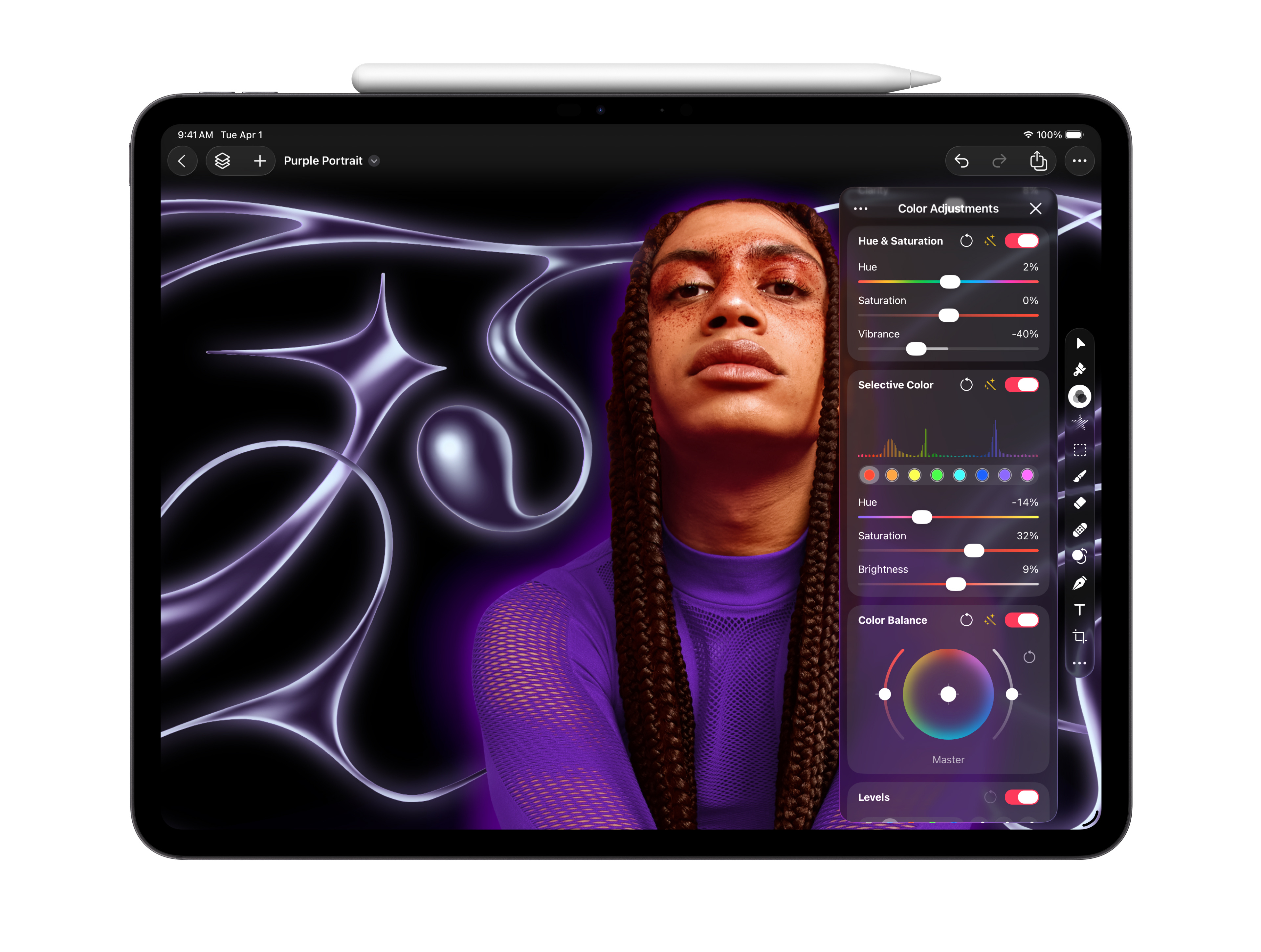
Creator Studio changes that calculus. Pixelmator Pro is coming to iPad for the first time, rebuilt from scratch for touch and Apple Pencil rather than ported over as an afterthought. Logic Pro for iPad gains Quick Swipe Comping, an industry-standard feature for assembling the best parts of multiple takes that was previously Mac-only. Final Cut Pro for iPad gets Montage Maker, an AI-powered editing tool that analyzes footage and assembles rough cuts automatically—and notably, this feature is iPad-first, not a hand-me-down from the Mac version.
This is Apple signaling that iPad isn’t the junior platform anymore. The AI features that make Creator Studio compelling—the semantic search, the automatic transcription, the intelligent editing suggestions—work across both Mac and iPad. A creator can start a project on their MacBook Pro at home, continue editing on an iPad on the train, and the intelligent features travel with them. The work lives in the ecosystem, not on a single device.
There’s a hardware play here too. The press release footnotes are revealing: many of the AI features require Apple silicon, and the iPad versions specifically call out M1 chips or later. Apple has been putting laptop-class processors in iPads for years, and Creator Studio finally gives those chips something to do. If you bought an M4 iPad Pro and wondered why you needed all that power for web browsing and email, now you have an answer.
The software requirements are also notable—several features require iPadOS 26, which means Apple is tying Creator Studio to its next major platform release. The mention of “Liquid Glass“ and new windowing improvements suggests iPadOS 26 will bring significant interface changes. Creator Studio isn’t just launching into the current iPad ecosystem; it’s launching alongside a redesigned one.
I don’t think any of this is accidental. Apple has been criticized for falling behind in AI, for shipping a half-baked Siri while OpenAI and Google race ahead with increasingly capable assistants. But Apple has never competed on who ships first. They compete on integration—on building things that work together in ways competitors can’t easily replicate because competitors don’t control the hardware, the operating system, and the applications simultaneously.
Creator Studio is a subscription product, yes. It’s recurring revenue, and Apple likes recurring revenue. It’s also an Adobe competitor at a fraction of the price—Creative Cloud Pro now runs $69.99 a month, more than five times what Apple is charging—which will matter enormously to students, freelancers, and small studios who’ve resented Adobe’s pricing for years. The education tier at $2.99 a month is almost aggressive—Apple clearly wants to lock in young creators before they develop Adobe muscle memory.
But more than any of that, Creator Studio is a statement about where Apple thinks AI belongs. Not in a chat window. Not as a standalone product you subscribe to separately. Embedded in the tools you already use, handling the parts of creative work that are tedious rather than inspired, invisible until you need it.
Whether this approach wins out over the chatbot-first model remains to be seen. But I’d bet Apple knows something the rest of the industry is still figuring out: most people don’t want to talk to their AI. They want their AI to shut up and do the work.